Learn how to create high-quality AI videos using ChatGPT and Google Veo 3 without expensive software or editing skills. Step-by-step guide for beginners.
Introduction
The landscape of video content creation has undergone a dramatic transformation in recent years. What once required expensive equipment, professional editing software, and specialized skills can now be accomplished using artificial intelligence tools that are not only powerful but also completely free or accessible to most users.
Two tools have emerged as game-changers in this space: ChatGPT for intelligent prompt generation and Google’s Veo 3 for AI-powered video synthesis. This comprehensive guide will walk you through the entire process of creating professional-quality videos using these tools, regardless of your technical background or experience level.
The combination of these tools represents a significant shift in content creation accessibility, democratizing video production in ways that were unimaginable just a few years ago. By the end of this guide, you’ll understand not just how to use these tools, but why they work so effectively together.
Understanding the Fundamentals
Before diving into the technical setup, it’s essential to understand what each tool does and why their combination is so powerful.
What is ChatGPT and Its Role in Video Creation?
ChatGPT, developed by OpenAI, is an advanced language model capable of understanding context and generating human-like text responses. In the context of video creation, ChatGPT serves a crucial purpose: it generates detailed, descriptive prompts that AI video generators can understand and translate into visual content.
The traditional approach to video creation involved the creator having a vision, then working with equipment and software to bring that vision to life. With ChatGPT, you can describe concepts in natural language, and the AI will enhance and refine your ideas into technically viable prompts for video generation.
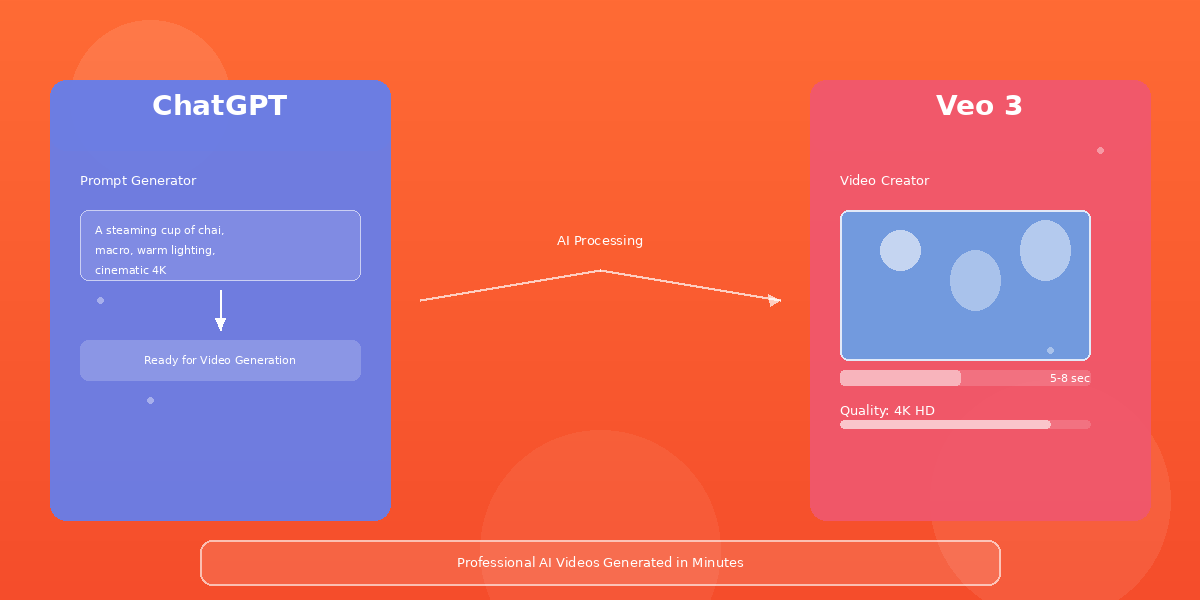
For example, if you describe “an old tea cup,” ChatGPT can transform that into: “A traditional ceramic tea cup with steam rising, warm morning light streaming through a window, shallow depth of field, professional photography style, 4K resolution.”
This process of prompt enhancement is crucial because AI video generators like Veo 3 require specific, detailed descriptions to produce high-quality output.
What is Google Veo 3?
Google Veo 3 is an advanced video synthesis model developed by Google DeepMind. It’s designed to generate videos from detailed text descriptions, producing cinematic quality output that rivals professional videography in many cases.
Veo 3 represents a significant advancement in AI video generation technology. Unlike earlier models, it can handle complex scenes, maintain consistency throughout the video, and produce output that looks natural and professional rather than artificial or glitchy.
The tool is currently available through Google Labs as a free trial, making it accessible to creators at all levels. The generated videos typically range from 5 to 8 seconds, which is ideal for social media platforms where shorter, loopable content performs best.
Setting Up ChatGPT: Your Creative Partner
Step 1: Accessing ChatGPT
Start by visiting chatgpt.com. You’ll need to create a free account using your email address or a Google/Microsoft account. The free tier of ChatGPT provides access to all the features you need for prompt generation.
Once logged in, you’ll see the main chat interface. This is where you’ll interact with ChatGPT to generate your video prompts.
Step 2: Finding Specialized GPTs
ChatGPT has a feature called “GPTs” – these are specialized versions of the model trained for specific purposes. While you can write prompts directly in the main ChatGPT interface, using a specialized GPT can significantly improve consistency and quality.
Navigate to the “Explore GPTs” section in the left sidebar. This will show you a marketplace of custom GPTs created by the community and OpenAI.
Step 3: Creating Your Own Prompt Formula
Rather than relying solely on existing GPTs, consider developing your own prompt formula. This ensures consistency across all your videos and helps you achieve your specific creative vision.
A effective video prompt should include:
- Main Subject: What is the video about?
- Setting/Environment: Where does it take place?
- Visual Style: What aesthetic are you aiming for?
- Lighting: How should the scene be lit?
- Camera Movement: Should the camera be static or moving?
- Resolution and Quality: Specify 4K, cinematic, professional quality
- Mood: What emotion should it convey?
For example, instead of asking ChatGPT to generate “a video about coffee,” you would ask for something more specific like: “Generate a cinematic video prompt for: A freshly brewed cup of espresso with latte art, morning sunlight creating warm golden tones, shallow focus on the cup rim, minimalist white table setting, professional food photography style, smooth camera pan from left to right, 4K resolution.”
Mastering Google Veo 3: Your Video Generator
Accessing Veo 3
Google Veo 3 is available through Google Labs at labs.google.com/veo. You’ll need a Google account to access it. The platform offers free trial credits that allow you to generate several videos before requiring payment.
Alternatively, if you have a ChatGPT Plus subscription, Veo 3 is integrated directly into the ChatGPT interface alongside other creative tools.
The Video Generation Process
Once you’ve logged into Veo 3, the process is straightforward:
- Click the “Create new video” button
- Paste your ChatGPT-generated prompt into the text field
- Select your video duration (5-8 seconds is optimal for virality)
- Choose your aspect ratio (9:16 for vertical social media, 16:9 for YouTube)
- Click “Generate” and wait 30-60 seconds for processing
Optimizing Settings for Maximum Quality
Duration Selection: Shorter videos (5-8 seconds) tend to perform better on social platforms because they’re more likely to be viewed completely and shared. They also work well for looping, which increases view counts.
Aspect Ratio Matters:
- 9:16 (vertical) works best for Instagram Reels, TikTok, and YouTube Shorts
- 16:9 (horizontal) suits YouTube standard videos
- 1:1 (square) works for LinkedIn and Facebook feeds
Quality Settings: Always select the highest quality option available. Professional-looking content performs better and maintains audience trust.
Style Consistency: If you’re creating a series, maintain consistent visual language by including similar descriptive terms in all your prompts.
The Strategic Workflow: Making Everything Work Together
Creating Your Content Calendar
The most successful content creators develop a systematic approach to content creation. Here’s a proven workflow:
Day 1: Brainstorm 10-15 concepts or objects you want to feature Day 2: Create ChatGPT prompts for each concept Day 3-4: Generate videos using Veo 3 Day 5-6: Edit and add captions/music if desired Day 7: Schedule posts across platforms
This systematic approach ensures consistent content output without the stress of daily decisions.
Maintaining Quality Control
Not every generated video will be perfect on the first try. It’s important to:
- Review each video before posting
- Generate multiple versions if the first attempt doesn’t meet your standards
- Keep track of which prompts produce the best results
- Refine your prompts based on successful outcomes
- Document your successful formula for future use
Adding Value Beyond the Video
While the AI-generated video is the core of your content, adding context dramatically improves engagement:
- Write compelling captions that add value or context
- Add on-screen text with key information
- Include call-to-action prompts encouraging shares and comments
- Add royalty-free background music that matches the mood
- Use trending audio when appropriate for your niche
Best Practices for AdSense-Compliant Content
If you plan to monetize through Google AdSense, it’s crucial to follow their policies:
Original Content Requirement
While using AI tools to generate videos is acceptable, ensure you’re not simply uploading raw AI output. Always add your unique perspective, commentary, or value addition. This could be:
- Your voiceover explaining the content
- On-screen graphics with your branding
- Educational context or interesting facts
- Proper attribution and sourcing
Avoiding Prohibited Content
Google AdSense has strict policies. Ensure your videos don’t contain:
- Misleading or deceptive content
- Inappropriate language or imagery
- Medical or financial misinformation
- Excessive clickbait or sensationalism
- Copyright-infringing material
Transparency About AI
Be transparent with your audience about your use of AI tools. This builds trust and aligns with Google’s guidelines. Many successful creators mention their use of AI in video descriptions or introductions.
Common Challenges and Solutions
Challenge: Generated Videos Look Artificial
Solution: Improve your prompt specificity. Instead of generic descriptions, use cinema terminology and be extremely detailed about the desired output.
Challenge: Long Processing Times
Solution: This is normal and expected. Veo 3 processing typically takes 30-60 seconds per video. Plan accordingly in your content calendar.
Challenge: Inconsistent Results
Solution: Keep detailed records of successful prompts. Note which descriptive elements, visual styles, and technical specifications produced the best results.
Challenge: Limited Free Trial Credits
Solution: If you exhaust free credits, Veo 3 offers reasonable paid options. Alternatively, Google’s VideoFX offers similar functionality with different credit allocation.
Advanced Strategies for Better Results
Prompt Engineering Principles
- Be Specific: Vague prompts produce vague results
- Use Visual References: Mention styles like “cinematic,” “documentary style,” or “fashion photography”
- Include Technical Details: Mention aspects like depth of field, lighting type, and resolution
- Avoid Negative Instructions: Instead of saying “not blurry,” say “sharp focus”
- Test Variations: Generate multiple videos with slightly different prompts to find optimal wording
Building a Prompt Library
Create a spreadsheet tracking:
- Original concept
- Final prompt used
- Video result quality (1-5 scale)
- Engagement metrics
- Successful elements to replicate
This becomes increasingly valuable over time, creating a personal knowledge base of what works.
Seasonal and Trending Content
Leverage current trends and seasonal themes:
- Align content with upcoming holidays
- Create videos based on trending topics in your niche
- Use trending audio and hashtags
- React to current events (when appropriate for your niche)
Conclusion
The combination of ChatGPT and Veo 3 represents a genuine democratization of video content creation. These tools don’t replace creativity or strategic thinking—they enhance your ability to bring ideas to life quickly and affordably.
The key to success lies not just in understanding how these tools work technically, but in developing a systematic approach to content creation. This means maintaining consistency, continuously refining your process, adding genuine value to your content, and building trust with your audience.
As AI tools continue to evolve, creators who master these technologies early will maintain a significant competitive advantage. However, remember that tools are just the beginning. Success ultimately depends on having valuable ideas, understanding your audience, and committing to consistent, quality content creation.
Start with one video today. Test the process. Iterate based on results. Scale what works. This methodical approach will serve you far better than trying to create dozens of videos before understanding what resonates with your specific audience.
The future of content creation is here, and it’s more accessible than ever before.
Feature Image Specifications
Filename: ai-video-creation-chatgpt-veo3-guide-hero.jpg
Dimensions: 1200 x 600 pixels (optimal for blog headers)
Alt Text: “AI video creation workflow showing ChatGPT prompt generation interface connected to Google Veo 3 video generator with colorful visual output”
Color Palette: Vibrant orange (#FF6B35), deep blue (#1A3A52), professional white (#F5F5F5), accent gold (#FFB703)
Design Elements to Include:
- Split-screen showing ChatGPT interface on left
- Veo 3 interface on right
- Colorful, professional video output samples in the center
- Clear, readable typography with main title
- Subtle gradient background
- Icons representing video creation, AI, and technology
- Professional but modern aesthetic
Mood: Professional, accessible, innovative, trustworthy